Direct calls with Twilio
Make voice calls to your customers directly from the platform using your Twilio account. Set up your credentials to enable outbound calls with automatic recording.
Connect Twilio, calendar, payments, and e-commerce to automate your flows from a single panel on WhatsApp. Fewer scattered apps, more connected processes.
Get a demo
Make voice calls to your customers directly from the platform using your Twilio account. Set up your credentials to enable outbound calls with automatic recording.
Sync events, payments, and orders automatically. Your customers receive confirmations and reminders on WhatsApp without manual intervention from your team.
Centralize calendar, billing, and e-commerce notifications in the same panel where you manage conversations. One place to run your business.
Connect your Twilio account to make voice calls to your customers directly from platform leads. Set up your credentials and try the integration in Whapi.chat.
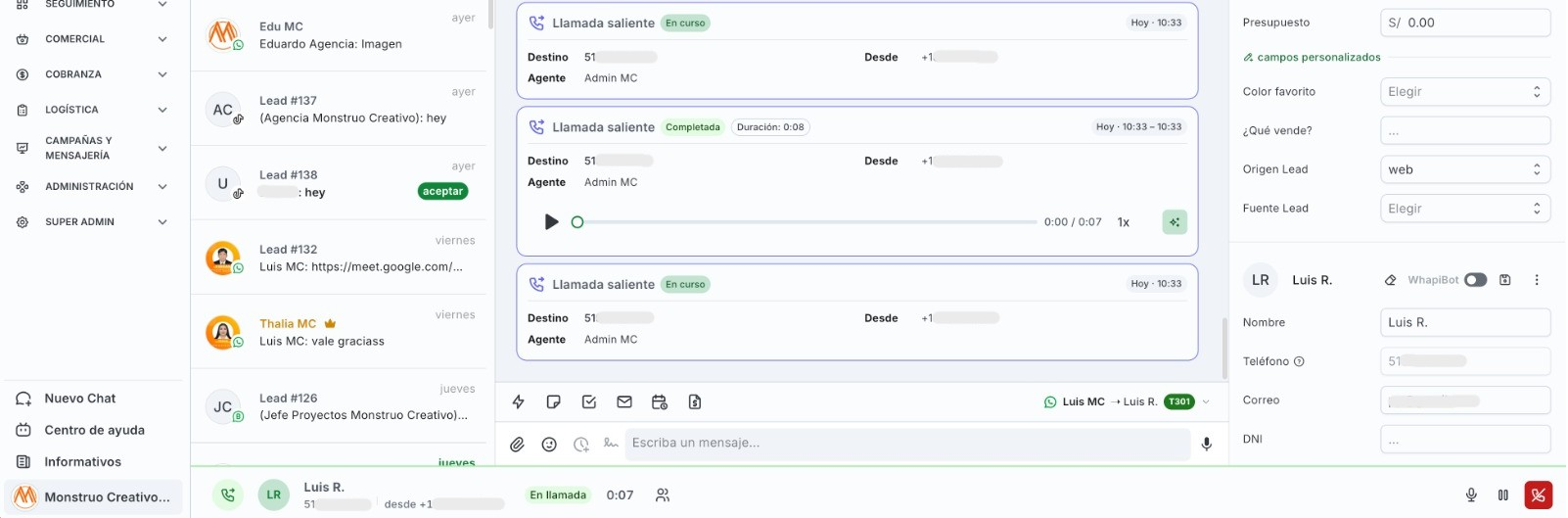
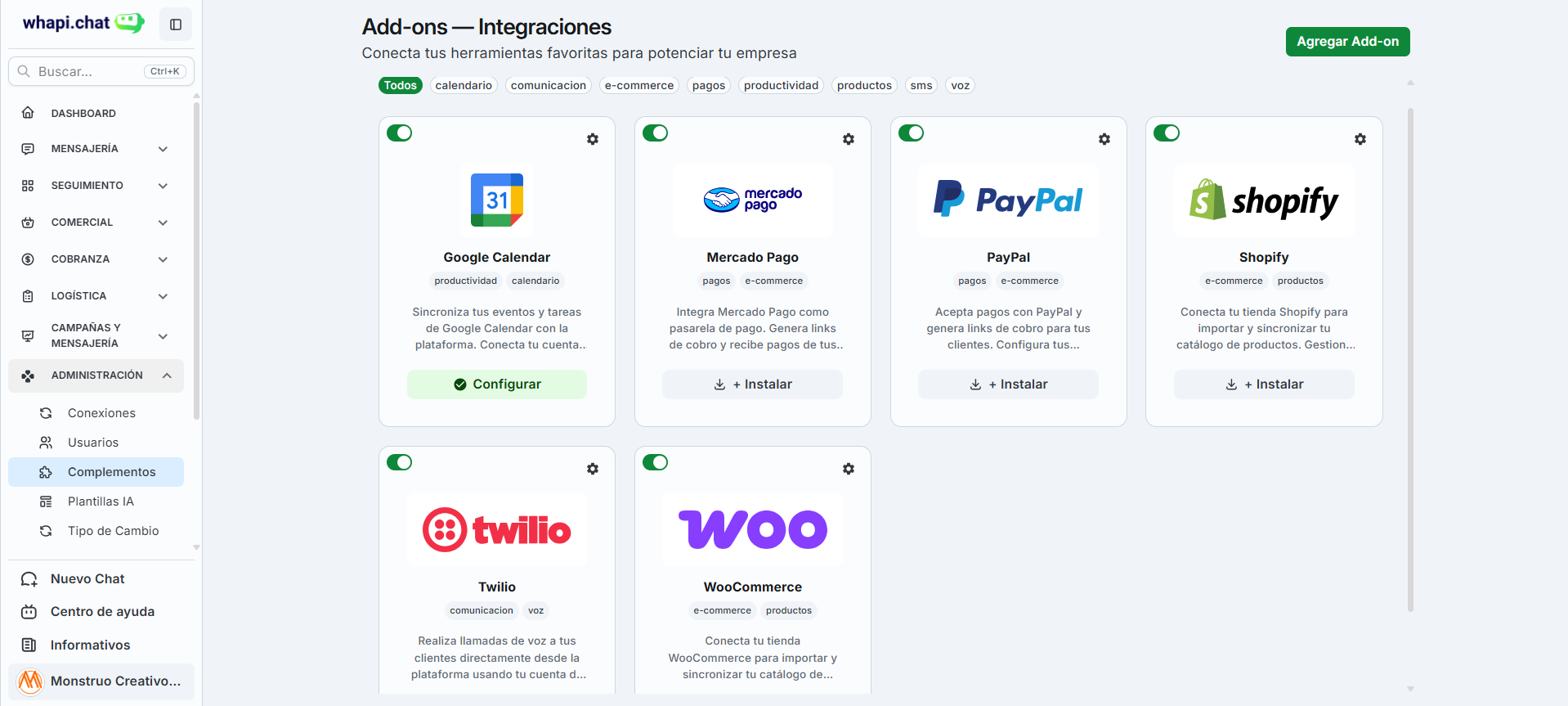
Integrate the tools you already use to sell and collect payments, and keep customers informed on the channel they prefer.
Automate sales, support, and workflows from one panel. Set up in minutes and take your business to the next level!
+2,400 teams already automate with whapi.chat


Hi, I’m Carlos Mendoza. Your latest promotion caught my attention—is it still available? I’d like to speak with a real person.


Hi, I’m Valeria Salas. I saw your Instagram ad and want the Pro promo, but I only have $180. Can I pay in installments?
1

Hi, I saw the TikTok video about the annual discount. I’m Miguel Torres—is the 40% still available for a 5-person company?
1

Hi, I’m Lucía Herrera from Facebook. I want the Growth pack—can you invoice Peru? My ID number is 12345678
1Favorites
Star a conversation to find it here in one tap.
Archived
When you archive a chat, it will appear here with full history.
May 22, 2026
Media
Images, videos, audio, and voice notes shared in this conversation will show up here.
Links
Links and URLs sent in the chat will be listed in this tab.
Documents
PDFs, Word, Excel, and other attachments from the conversation will appear here.
Tasks
When you create a task for this lead, it will appear here
Scheduled appointments
When you create an appointment for this lead, it will appear here
Quotes
When you create a quote for this lead, it will appear here
Product shipping
When a shipment is registered for this lead, it will appear here
Sales
When a sale is registered for this lead, it will appear here
Scheduled messages
When you schedule a message for this lead, it will appear here
Notes
When you create a note for this lead, it will appear here
Starred messages
When you star a message for this lead, it will appear here
What WhapiBot evaluated
The message combines a question about the active promotion and an explicit request to speak with a real person; primary intent is request information with human advisor handoff. Tone is friendly with clear buying interest. WhapiBot detects the name “Carlos Mendoza” in the text. It does not detect budget, email, or tax ID in this message; it records preference for a human agent.
WhapiBot runs lead field update. It sets Name = “Carlos Mendoza” and stage “New clients”. It does not extract email, budget, or tax ID at this point in the conversation.
Valeria requests the Pro plan with a $180 cap and asks about installments; intent is purchase negotiation with payment options. Tone is decisive and close-oriented. WhapiBot detects name, budget ($180), and email for sending the proposal. No spam signals.
WhapiBot runs lead field update. It sets Name = “Valeria Salas” and Budget = “$180”. It records Email = [email protected]. It moves the stage from “New clients” to “Interested clients” when she confirms interest in a human advisor.
Miguel asks about the 40% annual TikTok discount for a 5-person team; intent is pricing inquiry with enterprise discount. Tone is direct B2B. WhapiBot detects name and, from the lead message, tax ID and company name to build a quote.
WhapiBot runs lead field update. It sets Name = “Miguel Torres”. It records Tax ID = 20612345678 and Company = “Exportaciones Innovadoras S.A.C.”. It changes the stage to “Interested clients”.
Lucía requests the Growth pack with Peru invoicing and provides her ID in the message; intent is purchase with local billing. Tone is informative and quote-ready. WhapiBot detects name, country, and identity document.
WhapiBot runs lead field update. It sets Name = “Lucía Herrera”, Country = “Peru”, and ID = “12345678”. It sets stage “New clients” and updates it to “Interested clients” when the lead asks for an advisor.
Choose which number to call Carlos Mendoza · +51 999888777