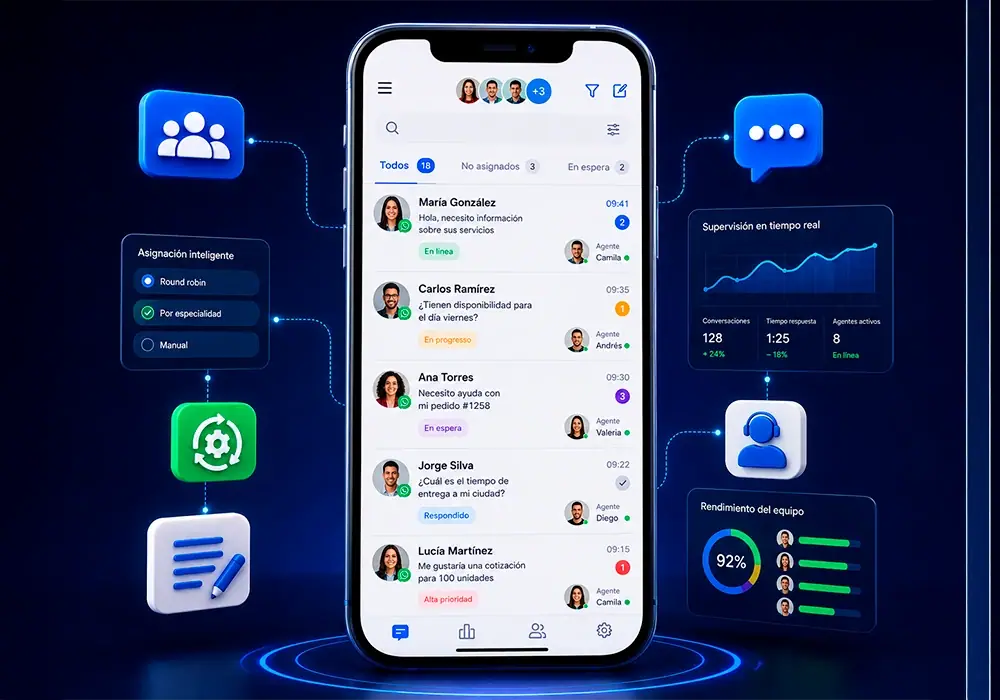
When several people answer the same WhatsApp number, problems multiply fast: duplicate replies, unassigned leads, confused customers, and zero accountability. Multi-agent management fixes this with a shared inbox, clear ownership per chat, and supervisor visibility—without forcing customers to message different numbers.
One number, entire team
With whapi.chat, every agent works from the same inbox in the browser. Each conversation has one responsible owner, so two reps never answer the same client with conflicting information. Customers still see one familiar business line; your team sees organized queues behind it.
Smart assignment options
Configure routing to match how you operate:
- Round robin: Distribute new chats evenly across available agents
- By specialty: Route to sales, support, billing, or regional queues
- Manual assignment: Supervisors place complex or VIP cases with senior reps
Combine rules with business hours so after-hours messages trigger auto-replies and queue for the next shift.
Visibility and coaching
Supervisors monitor live workload: who owns which chat, first-response time, and pending backlog. During peaks, reassign chats in seconds instead of asking the team to forward screenshots on internal chat.
That visibility supports coaching—identify top performers, spot training gaps, and balance load before SLAs break.
Internal collaboration
Internal notes let an agent document context for whoever takes over—essential for shifts, vacations, or escalation to a specialist. The customer never sees the note; the next agent picks up with full context.
Measurable results
Teams that adopt structured multi-agent workflows often report shorter first-response times and higher satisfaction because customers are not left wondering if anyone received their message.
Implement with whapi.chat
Start by defining queues (sales vs support), assignment rules, and escalation paths. Train agents to claim or receive assigned chats only through the panel—not from personal phones. whapi.chat keeps history, tags, and CRM stages tied to each thread so handoffs are seamless.
SLAs and quality standards
Define first-response and resolution targets per queue. whapi.chat reporting highlights agents who consistently meet SLAs and conversations that breached them—useful for bonuses and training plans.
Quality beats speed when the issue is complex: set expectations in auto-replies (“We typically reply within 10 minutes in business hours”) so customers trust the process.
Security and access control
Role-based permissions ensure junior agents see only their assigned chats while supervisors access full queues. Disable personal phone handling of business numbers to protect data and avoid fragmented history.
Multi-agent WhatsApp is not about more people typing faster—it is about one coordinated team on one number, with whapi.chat as the control center.